


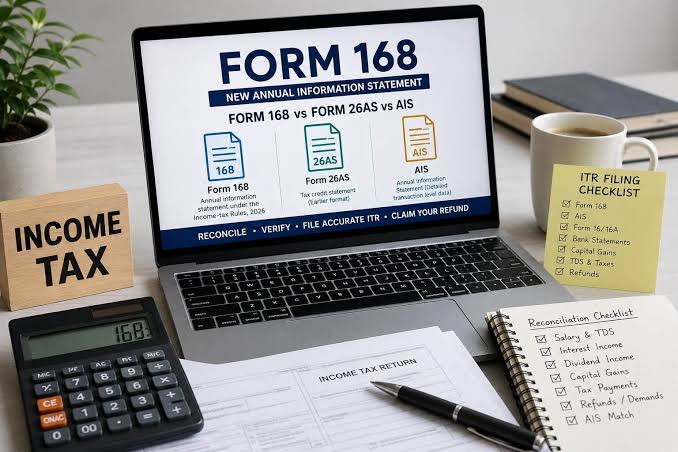
Taxpayers preparing an income-tax return should compare their own records with the Annual Information Statement, Taxpayer Information Summary and the annual tax statement issued by the Income-tax Department. The familiar Form 26AS has been renumbered as Form 168 under the Income-tax Rules, 2026, while AIS continues to provide a broader view of financial information reported against a taxpayer’s PAN. Understanding the difference helps prevent omitted income, incorrect tax-credit claims and avoidable notices.
AIS is not a tax bill and it is not a complete substitute for a taxpayer’s books, bank statements or investment records. It is a statement of information available to the department from reporting entities and other sources. A transaction shown in AIS may need explanation, and a transaction missing from AIS may still be taxable. The final responsibility for reporting complete and accurate income remains with the taxpayer.
What AIS, TIS and Form 168 show
The Annual Information Statement is a transaction-level view of information associated with a PAN for a financial or tax year. Banks, employers, mutual fund companies, stockbrokers, property registrars and other reporting entities send information to the tax department under prescribed reporting requirements. Depending on the source, AIS can show salary-related information, tax deducted or collected at source, interest, dividends, securities transactions, specified financial transactions, tax payments, demands and refunds, and other information received by the department.
The Taxpayer Information Summary is the category-wise summary prepared from AIS data. It groups information into categories such as salary, interest, dividends, capital gains and taxes paid. The summary can show a value processed by the system and a value accepted by the taxpayer or confirmed by the source after feedback. TIS is useful when preparing a return, but it should not be treated as a final calculation of taxable income without checking the underlying transactions and applicable tax rules.
Form 168 is the new form number corresponding to the earlier Form 26AS under the Income-tax Rules, 2026. The updated government FAQ identifies Form 168 as the successor to the earlier Form 26AS and describes the information available through AIS and TIS. Older help pages and familiar references may still use the term Form 26AS, so taxpayers may see both names in search results or older documents. The relevant year and the current portal label should be checked before relying on an old instruction.
The central distinction is that AIS is broader and includes transaction information from multiple sources, while the annual tax statement focuses on tax deducted or collected and related tax information under the applicable form. TIS condenses the detailed AIS records into category totals. They are connected, but they are not interchangeable. A taxpayer should use them together with Form 16 or Form 16A, bank certificates, broker statements and personal records.
How to view and download AIS and TIS
To access AIS, log in to the official Income-tax e-filing portal using the taxpayer’s own credentials. The department’s current guidance provides an AIS option on the dashboard and through the e-File section. After selecting the relevant year, the taxpayer can open the AIS tile and review the detailed information. The TIS tab on the same dashboard shows the category-wise summary.
The portal allows AIS to be downloaded in PDF, JSON and CSV formats. PDF is convenient for reading and retaining a copy; CSV can help taxpayers sort transactions and compare them with bank or broker records; JSON is useful for systems that process structured information. Keep a copy of the statement and note the date on which it was downloaded, because information and feedback status may change.
To review the annual tax statement, use the relevant tax-statement option in the e-filing account. The portal may route the user to the tax-information service used for the applicable form and year. Because the form number changed under the 2026 rules, a taxpayer should follow the current portal navigation rather than assume that an older screenshot showing “View Form 26AS” will look identical for every year.
Never use a link sent by an unknown caller or an unsolicited message to enter tax credentials. Open the department’s portal through a trusted route, check the address bar and avoid sharing passwords or one-time passwords with anyone who claims to be helping with a refund. Tax statements contain sensitive financial information and should be stored securely.
How to reconcile the statements before filing
Start with salary. Compare the salary figures in AIS and TIS with Form 16, payslips and the employer’s annual statement. Differences can arise from a revised TDS return, a change in salary components, arrears, perquisites or a reporting period that does not match the year being reviewed. Do not assume that the largest figure is automatically correct. Identify the source and the period before deciding what belongs in the return.
Next, check interest income. Savings accounts, fixed deposits, recurring deposits and other products may generate interest that appears in AIS. Compare the reported amount with bank interest certificates and account statements. If an account was closed, a deposit was renewed or interest was credited in a different period, keep the bank record that explains the difference. Interest may be taxable even if no tax was deducted at source.
Investors should compare dividends, mutual fund transactions, securities sales and capital-gains statements with records from their registrar, fund house or broker. AIS may show gross transaction information that needs to be reconciled with cost, purchase date, corporate actions, fees and the applicable tax treatment. A sale value is not the same as taxable capital gain. The taxpayer should use the detailed contract notes and statements rather than treating the AIS transaction amount as profit.
Check tax payments separately. Advance tax and self-assessment tax should be matched with challan details and the tax-statement record. If a payment is missing or appears against the wrong year or PAN, retain the challan receipt and verify the details before filing. TDS credit should be compared with the employer’s or deductor’s certificate and the relevant tax statement. A tax deduction shown on a salary slip but absent from the statement may require the deductor to correct its filing.
Property transactions, foreign remittances and other specified financial transactions may also appear. A reportable transaction does not necessarily mean the entire amount is taxable income. A property purchase is not itself income; it may be a source of information that the department expects the taxpayer to explain or reconcile. Likewise, a securities sale must be evaluated under the rules that apply to the asset and holding period.
The department provides a feedback facility for eligible information shown in AIS. Open the relevant transaction, select the feedback option and choose the reason that best describes the issue, such as an incorrect value, duplicate entry or information that does not relate to the taxpayer. Provide a clear explanation and retain the acknowledgement. The activity-history section records the feedback activity and the statement can show the reported value alongside a modified value after the feedback is processed or confirmed by the source.
Feedback is not a shortcut for deleting income that is genuinely taxable. If a bank has reported interest correctly, a taxpayer cannot mark it as unrelated simply because it was not expected. If the amount is wrong, contact the reporting entity and ask it to correct the underlying information where appropriate. A feedback submission does not automatically amend a bank statement, a TDS return or the taxpayer’s income-tax return.
If TDS is missing, contact the employer, bank or other deductor and ask whether the relevant statement was filed correctly. If a transaction is duplicated, compare the dates, source names and amounts before submitting feedback. If the information belongs to another person, explain why and preserve the documents that support the response. The department’s FAQ says TIS is not edited directly by the taxpayer; it is updated after the feedback is processed.
Do not leave income out of the return merely because it does not appear in AIS. The department’s own guidance states that all actual income must be reported even when it is not displayed in the statement. The same principle applies in reverse: a gross transaction reported in AIS may require reconciliation before it is treated as taxable income. The return should reflect the law and the taxpayer’s records, not a mechanical copy of every line in the statement.
For a complex mismatch involving capital gains, foreign assets, business receipts, property transactions or a disputed tax credit, obtain help from a qualified tax professional. Keep the original statement, the feedback acknowledgement, bank or broker documents and correspondence with the reporting entity. This creates a clear record if the issue is later raised in an assessment or verification.
Download AIS and TIS for the correct year, review Form 168 or the applicable annual tax statement, and compare salary with Form 16. Check bank interest, dividends, securities transactions, property information and tax payments. Verify TDS credits against the deductor’s certificate. Submit feedback for genuine errors and contact the source when a correction is required. Save the acknowledgement and download the updated statement after the department processes the response.
Finally, compare the reconciled information with the return form that applies to the taxpayer. The statement can help identify information already available to the department, but it cannot decide whether a person is eligible for a deduction, exemption or particular tax treatment. Those questions depend on the facts, the applicable year and the law in force.
The move from Form 26AS to Form 168 is a change taxpayers should recognise, but the underlying discipline remains the same: check the department’s information against your own records, correct genuine errors and report all income accurately. AIS, TIS and the annual tax statement are tools for reconciliation, not a replacement for careful filing.
Frequently asked questions
Is Form 168 the same as the old Form 26AS?
Form 168 is the corresponding form under the Income-tax Rules, 2026, replacing the earlier Form 26AS reference. Older guidance may still use the previous name, so taxpayers should follow the current portal label for the relevant year.
Does AIS show every item of income?
No. AIS shows information presently available to the Income-tax Department from reporting sources. Taxpayers must report complete and accurate income even when a transaction is not displayed in AIS.
Can a taxpayer edit TIS directly?
No. Feedback is submitted against eligible information in AIS. TIS is updated after the department processes the feedback or receives confirmation from the reporting source.




Comments (0)
Be the first to comment. Comments are published after moderation.